How to visualize nested JSON
Nested JSON contains objects or arrays inside other objects or arrays. A visualizer helps you follow the hierarchy, check data types, and locate a value without counting braces.
Nested JSON contains objects or arrays inside other objects or arrays. A visualizer helps you follow the hierarchy, check data types, and locate a value without counting braces.
{
  "data": [{ "id": 7, "profile": { "name": "Ada", "active": true } }],
  "meta": { "next": null }
}
The root is an object. Its data property is an array; the first array item is an object. Inside that object, profile.name is a string and profile.active is a boolean. The null in meta.next is an explicit value, not a missing property.
Open the example or paste your JSON in the homepage input.
Use the chevron on an object or array to collapse or expand that branch. Repeated rows may start collapsed.
Keep Type badges enabled to distinguish 7 from "7", true from "true", and null from an empty string.
Search for a key or value. Matches are highlighted; large files show a capped result set and a total count.
Click the value to pin its path, then use Copy path in the path bar. For the name above, the path is $.data[0].profile.name.
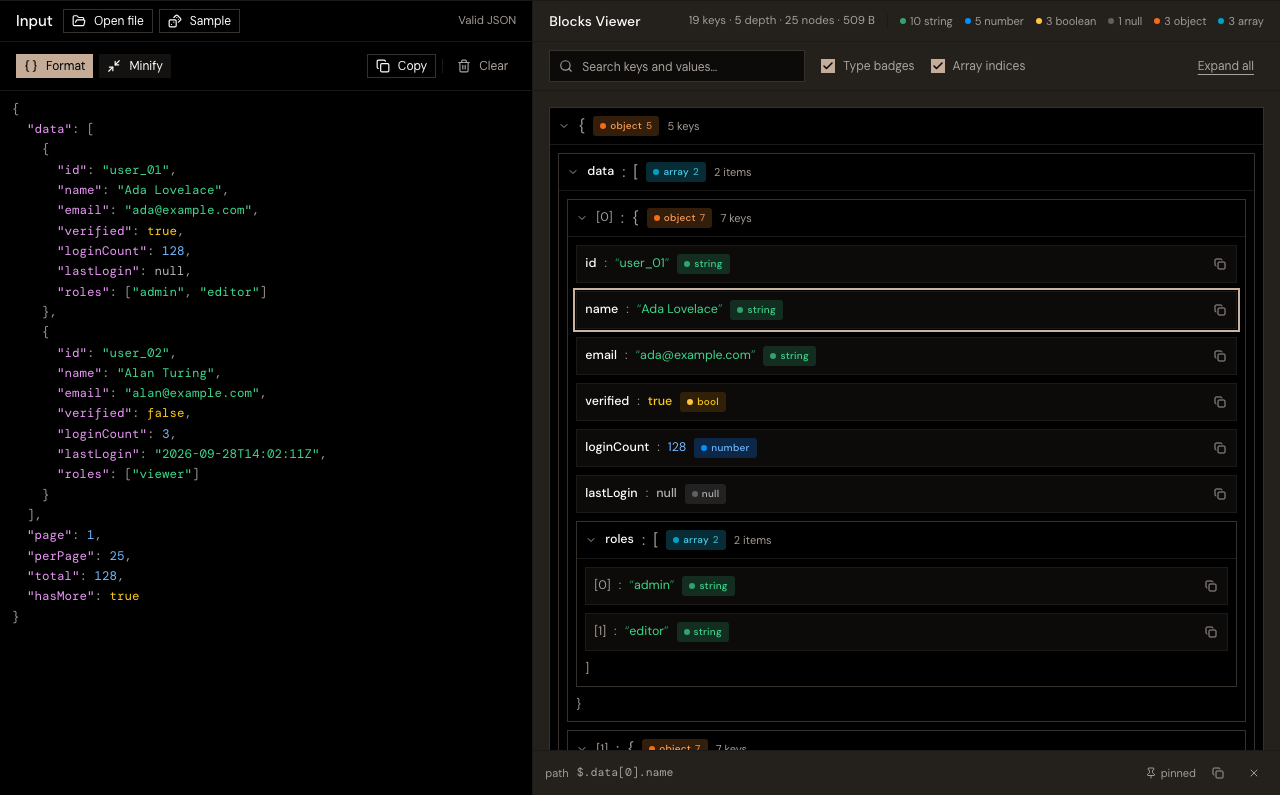
Arrays use zero-based indices: [0] is the first element. A property containing a dot or space uses brackets, such as $["request.id"]. That key is different from $.request.id, which follows two nested properties.
Open a .json file and expand the branches you need. Documents over 200,000 characters use background parsing and a read-only editor preview. The full document still powers search and copying. Edit full document restores the complete text editor and may take more layout time. Very deep trees have a rendering depth limit; copying a capped subtree lets you inspect it separately.
Expanding, collapsing, searching, and pinning paths do not change the input. Format and Minify rewrite the text, so keep the original file when exact formatting or number precision matters.
The viewer displays concrete paths to values. It does not execute general JSONPath filters, wildcards, or expressions. Use the path finder for a list of concrete paths and jq snippets.